
티스토리 뷰
※모든 자료들은 이화여자대학교 최윤정 교수님의 강의자료를 기반으로 했습니다.
멀티태스킹
: 하나의 cpu가 여러 작업(음악+공부+브라우징+다운로딩) 빠르게 번갈아(동시 처리로 보임)하는
멀티프로세스
여러 cpu 이용해 여러 프로세스 동시에 실행
프로세스(os에서 관리하는 실행단위)
프로세스간 메모리 공유 안하고 독립적, 안정성 높음.
웹 브라우저(os)가 탭마다 별도의 프로세스 띄운다(게임+영상재생+음악)
멀티쓰레드
하나의 프로세스 내에서 미니 프로세스들 동시에 수행
쓰레드는 메모리 공유하고(프로세스 내부니까) 그래서 동기화 문제 발생 가능.
게임 예) 음악, 네트워크통신, 사용자 입력처리, 그래픽 렌더링 등 별도 쓰레드들이 협력해서(메모리 공유하며) 움직이고 있다.
속도는 빠르지만…. 제어 필수
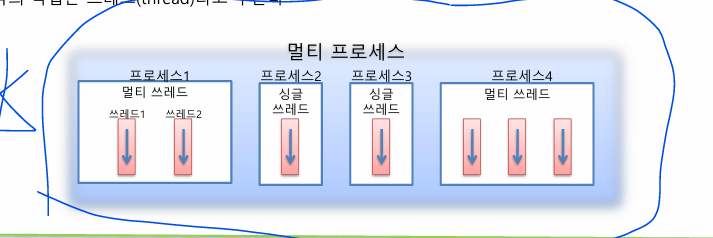
Java 멀티쓰레드 : 기본 멀티쓰레드 지원
- 메인 쓰레드 main()메소드 실행하면서 시작한다, 순차적으로 실행
- 실행종료 조건: 마지막 코드 실행 시, return문 만날때
- Main쓰레드는 작업 쓰레드들 병렬로 코드 실행 (순서 보장 안됨)
- 종료 :
- 싱글 쓰레드: 메인 종료 시 종료
- 멀티 쓰레드: 실행 중인 쓰레드 있으면 프로세스 종료 안됨
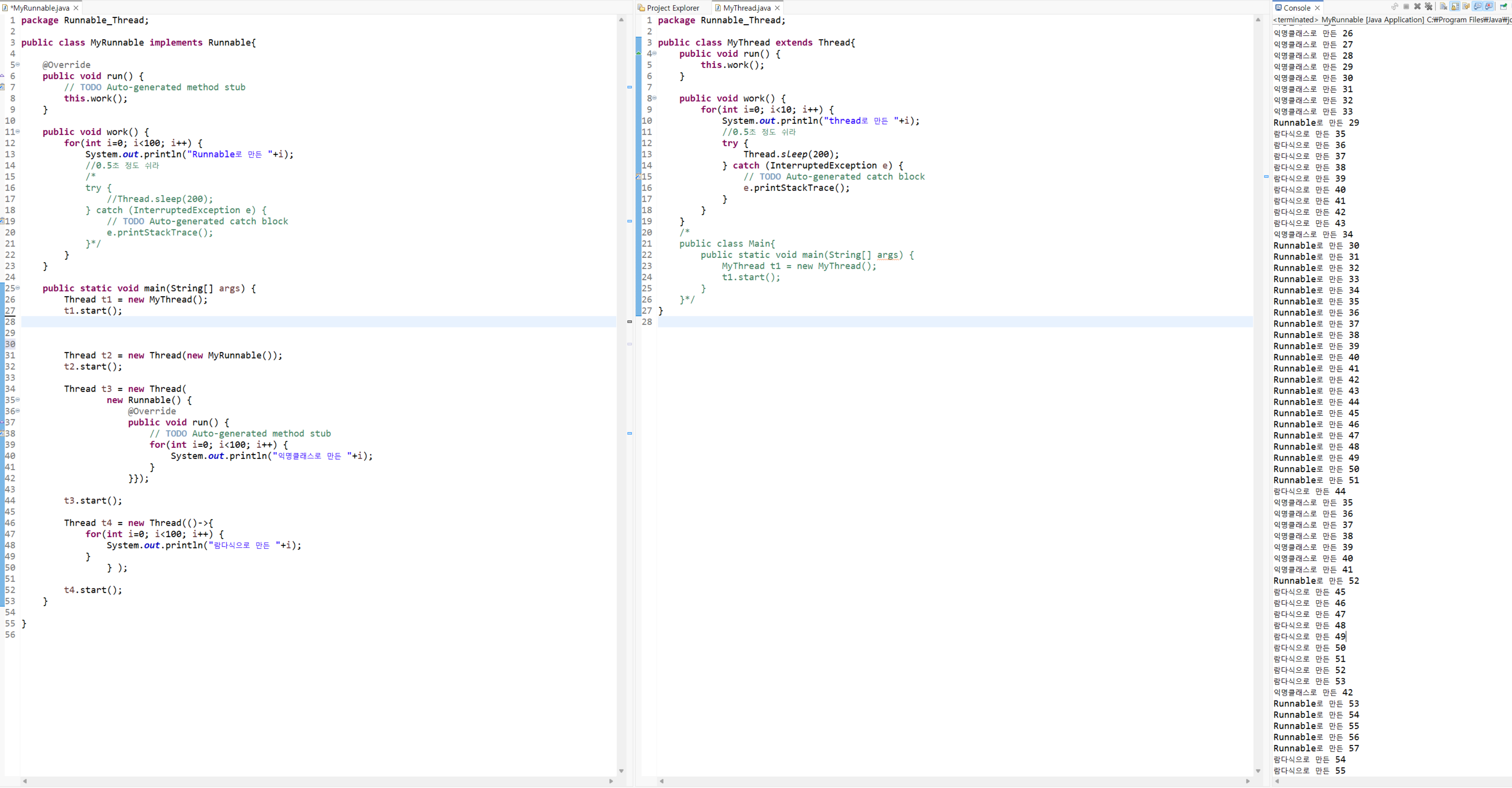
Lab1 : 쓰레드 생성과 실행
- 방법1 : Thread 클래스 extends
- run()메소드 오버라이딩
- thread 객체.start() 호출
- 방법2 : Runnable 인터페이스 implements
- run()메소드 오버라이딩
- thread 객체 생성 후, runnable객체를 thread의 매개변수로 넘김
Thread t1 = new Thread(new MyRunnable()); - Thread 객체.start() 호출
- 단일 상속 원리에 의해 이미 다른 클래스 상속받아서 인터페이스 쓸 수 밖에 없을 때가 있고, 이 방법을 실제 많이 씀
- 방법3 : 익명 클래스
- 방법4 : 람다식 사용
//방법1
public class MyThread extends Thread{
    public void run() {
        this.work();
    }

    public void work() {
        for(int i=0; i<10; i++) {
            System.out.println("thread로 만든 "+i);
            //0.5초 정도 쉬라
            try {
                Thread.sleep(200);
            } catch (InterruptedException e) {
                // TODO Auto-generated catch block
                e.printStackTrace();
            }
        }
    }
//방법2
public class MyRunnable implements Runnable{

    @Override
    public void run() {
        // TODO Auto-generated method stub
        this.work();
    }

    public void work() {
        for(int i=0; i<10; i++) {
            System.out.println("Runnable로 만든 "+i);
            //0.5초 정도 쉬라
            try {
                Thread.sleep(200);
            } catch (InterruptedException e) {
                // TODO Auto-generated catch block
                e.printStackTrace();
            }
        }
    }
//방법3
Thread t3 = new Thread(
                new Runnable() {
                    @Override
                    public void run() {
                        // TODO Auto-generated method stub
                        for(int i=0; i<10; i++) {
                            System.out.println("익명클래스로 만든 "+i);
                        }
                    }});

        t3.start();

//방법4
        Thread t4 = new Thread(()->{
            for(int i=0; i<10; i++) {
                System.out.println("람다식으로 만든 "+i);
            }
                } );

        t4.start();
    }
주요 메소드, 우선순위(항상 반영x)
| 메소드 | 의미 |
|---|---|
| void start() | run()실행하고 싶으면 start로 run 호출하기 |
| void run() | thread가 실행할 것들 담아놓는다. |
| static void sleep(long millis) | 밀리초 동안 너 기다려. |
| void interrupt() | 중단하도록 신호 날리는 애 |
| void join(), join(longmillis) | 다른 thread 종료때까지 현재 thread대기시킴. |
| int getPriority() | 이거 안먹힘 os마음이다. |
| void setPriority(int priority) | 이거 안먹힘 os마음 |
Lab3: 짱구맹구흰둥이
- Thread 상속과 Runnable 구현, 객체.start(); 순으로 실행되지 않는다. 순서는 os 마음이다.
package 랩3_짱구맹구흰둥이;

public class Main {

    public static void main(String[] args) {
        // TODO Auto-generated method stub

        //Thread 상속
        Thread p1 = new Player1("짱구", "신난다신난다~", 20);
        Thread p2 = new Player1("맹구", "훌쩍~", 20);
        Thread p3 = new Player1("흰둥이", "멍멍멍멍~", 20);

        //Runnable 구현
        Thread th1 = new Thread(new Player2("**짱구", "신난다신난다~", 10));
        Thread th2 = new Thread(new Player2("**맹구", "먕먕~", 10));
        Thread th3 = new Thread(new Player2("**흰둥이", "멍멍멍~", 10));

        System.out.println(p1.getName());//Thread-0??
        System.out.println(p2.getName());//Thread-1??
        System.out.println(p3.getName());//Thread-2??

        System.out.println(th1.getName());
        System.out.println(th2.getName());
        System.out.println(th3.getName());
        th1.setName("**짱구");//이거 왜 하는거지...??
        System.out.println(th1.getName());

        //누가 먼저 시작, 누가 먼저 끝남? os 생각은?
        p1.start();
        p2.start();
        p3.start();

        th1.start();//먼저 시작함
        th2.start();
        th3.start();
    }

}
----------------------------
package 랩3_짱구맹구흰둥이;

public class Player1 extends Thread{
    String name;
    String sound;
    int time;

    //초기화용 생성자
    public Player1(String name, String sound, int time) {
        this.name = name;
        this.sound = sound;
        this.time = time;
    }

    //extends Thread했기에 써야하는 run()메소드
    public void run() {
        int i=0;
        while(true) {
            if(i==time) break;//시간 다되면 끝
            System.out.printf("%d %s %s \n", (i+1), name, sound);
            i++;
        }
        System.out.println(name+"끝");
    }
}
-------------------------------------
package 랩3_짱구맹구흰둥이;

public class Player2 implements Runnable {
    String name;
    String sound;
    int time;

    public Player2(String name, String sound, int time) {
        this.name = name;
        this.sound = sound;
        this.time = time;
    }

    @Override
    public void run() {
        // TODO Auto-generated method stub
        int i=0;
        while(true) {
            if(i==time) break;
            System.out.printf("%d %s %s \n", (i+1), name, sound);
            i++;
        }
        System.out.println(name+"끝");

    }

}
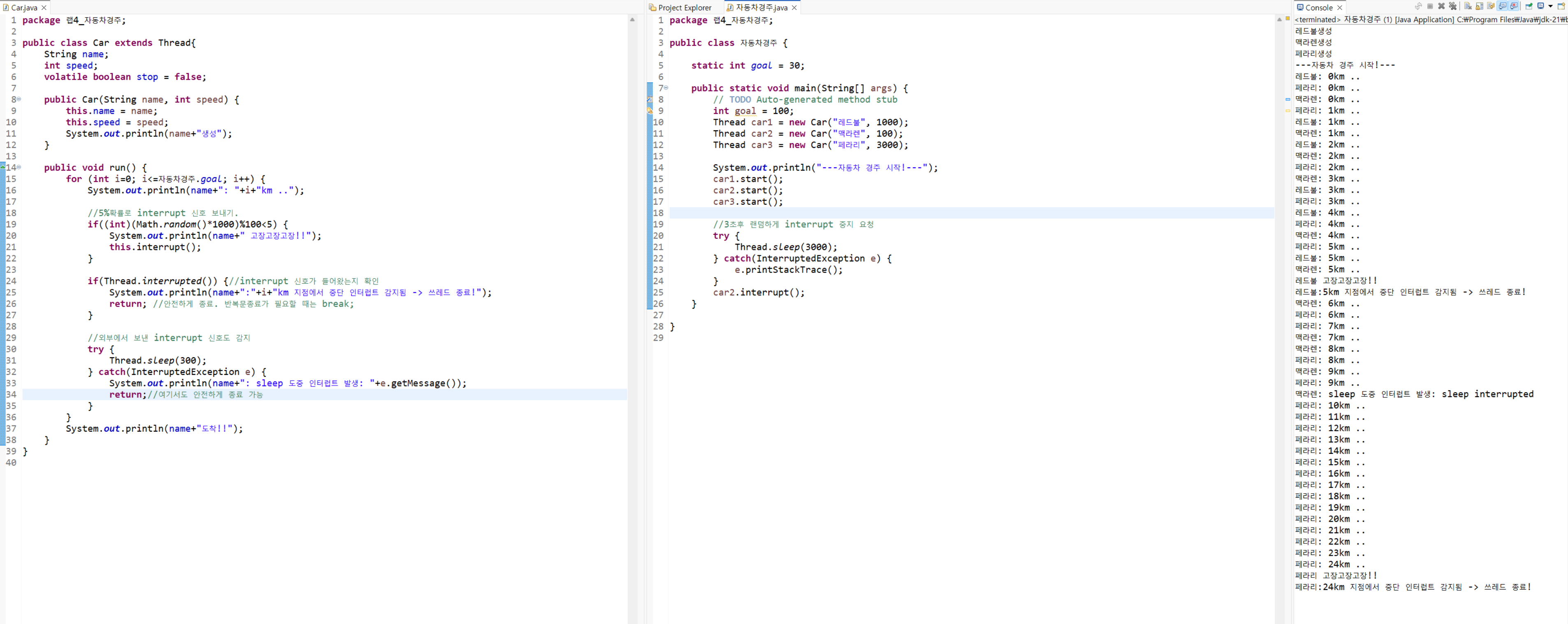
Lab4: 자동차 경주
- interrupt() 함수 사용
package 랩4_자동차경주;

public class 자동차경주 {

    static int goal = 30;

    public static void main(String[] args) {
        // TODO Auto-generated method stub
        int goal = 100;
        Thread car1 = new Car("레드불", 1000);
        Thread car2 = new Car("맥라렌", 100);
        Thread car3 = new Car("페라리", 3000);

        System.out.println("---자동차 경주 시작!---");
        car1.start();
        car2.start();
        car3.start();

        //3초후 랜덤하게 interrupt 중지 요청
        try {
            Thread.sleep(3000);
        } catch(InterruptedException e) {
            e.printStackTrace();
        }
        car2.interrupt();
    }

}

--------------------
package 랩4_자동차경주;

public class Car extends Thread{
    String name;
    int speed;
    volatile boolean stop = false;

    public Car(String name, int speed) {
        this.name = name;
        this.speed = speed;
        System.out.println(name+"생성");
    }

    public void run() {
        for (int i=0; i<=자동차경주.goal; i++) {
            System.out.println(name+": "+i+"km ..");

            //5%확률로 interrupt 신호 보내기.
            if((int)(Math.random()*1000)%100<5) {
                System.out.println(name+" 고장고장고장!!");
                this.interrupt();
            }

            //강종은 위험하니 종료해줄래? 요청, 협조 방식
            if(Thread.interrupted()) {//interrupt 신호가 들어왔는지 확인
                System.out.println(name+":"+i+"km 지점에서 중단 인터럽트 감지됨 -> 쓰레드 종료!");
                return; //안전하게 종료. 반복문종료가 필요할 때는 break;
            }

            //외부에서 보낸 interrupt 신호도 감지
            try {
                Thread.sleep(300);
            } catch(InterruptedException e) {
                System.out.println(name+": sleep 도중 인터럽트 발생: "+e.getMessage());
                return;//여기서도 안전하게 종료 가능
            }
        }
        System.out.println(name+"도착!!");
    }
}
쓰레드 중간정리
Thread & Runnable 정리
- Runnable 인터페이스
runnable 인터페이스 쓰자
run() 메소드 종료 → 쓰레드 종료 (살아있게 하려면 무한루프 필요)
한 번 쓰레드 종료하면 다시 객체 생성하고 start() 호출해야
-주요 메소드 기억
- start()
- run()
- join()
- sleep()
- wait()
- interrupt()
- notify , notifyAll()
🔹 start()
run()호출하는 쓰레드 시작 함수
Thread객체.start();
🔹 run()
쓰레드 수행하는 것들을 담는 메소드
🔹 sleep()
현재 쓰레드 일시 정지시킨다.
Thread.sleep(1000);//1초 쉬기
🔹 join()
비유: A 발표 중, 끝날 때까지 기다렸다가 B 발표할 것.
그럼 B는 A.join()을 호출한 것과 같다.
“A 끝나면 나도 발표할게”
Thread A = new Thread(() -> { System.out.println("A 작업 중..."); });
A.start();
A.join(); // 여기서 현재 쓰레드(main 등)가 A가 끝날 때까지 기다림
System.out.println("A 끝났으니 이제 내 차례!");
🔹 interrupt()
랩4에서도 자동차 쓰레드가 돌고 있다가 고장 나면 스스로 interrupt() 호출해서 나 멈출게. 이러는거.
중단 요청을 보내는 함수. 너무 길어서 중단하고 싶을 때 이 함수로 요청을 보낸다.
종료해줄래? 요청, 협조 방식 (강종 위험 막으려고)
🔹 notify()/wait()
wait()은 누가 깨워주길 기다리다가 notify()가 호출되면 깨어나는 거
단, wait()은 synchronized 블록에서만 사용 가능하다.
Lab5 MyBank
- synchronized 키워드로 한 번에 한 쓰레드만 접근할 수 있도록
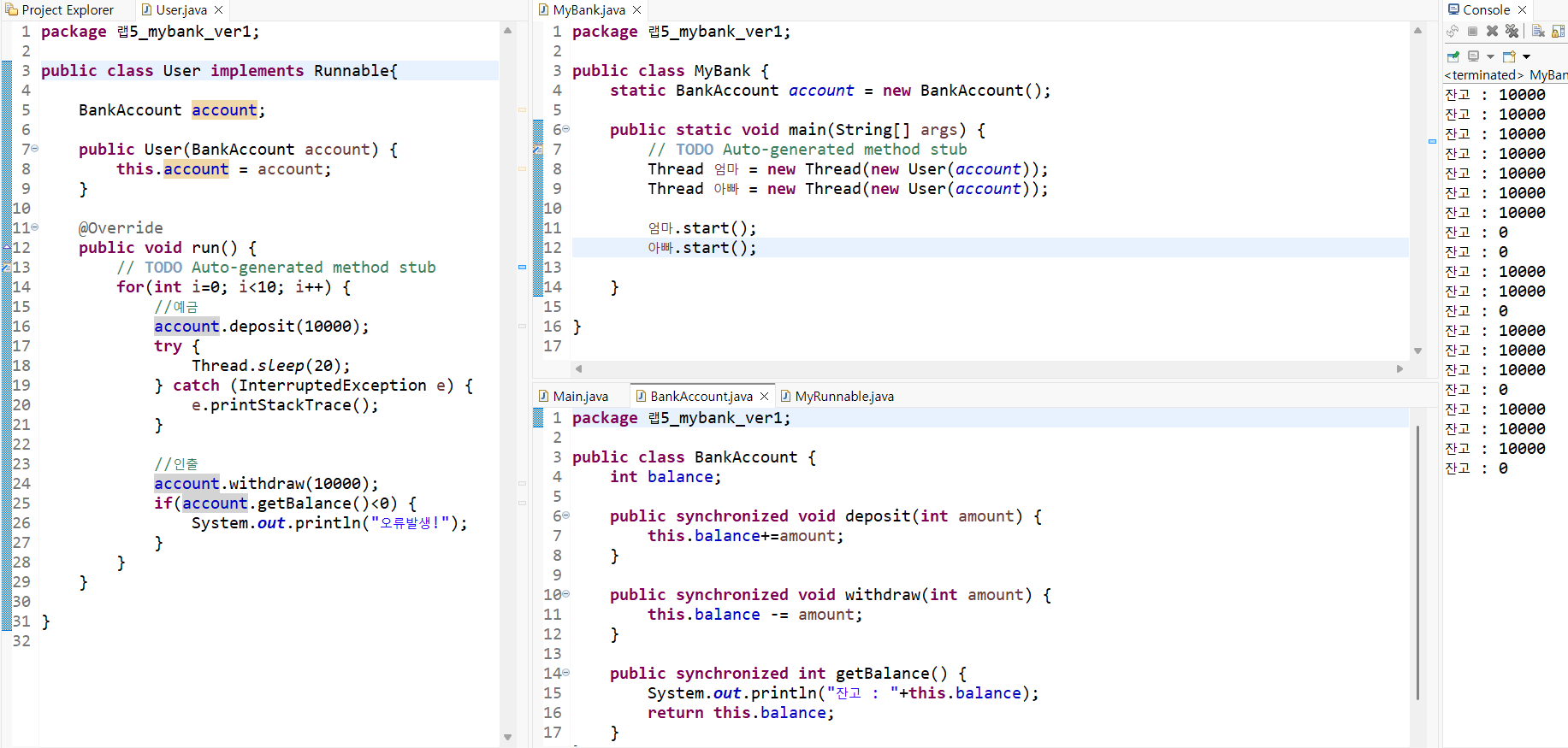
수정사항 : 완전 기초적이라, 누가 인출하고 누가 예금하는지 보이지 않는다.
Lab6 FamilyBank(v1)
- 출금자 Thread로 상속, 예금자 Runnable 구현,
join() 메소드 추가하여 예금자/출금자 끝날 때까지 출금자/예금자 대기
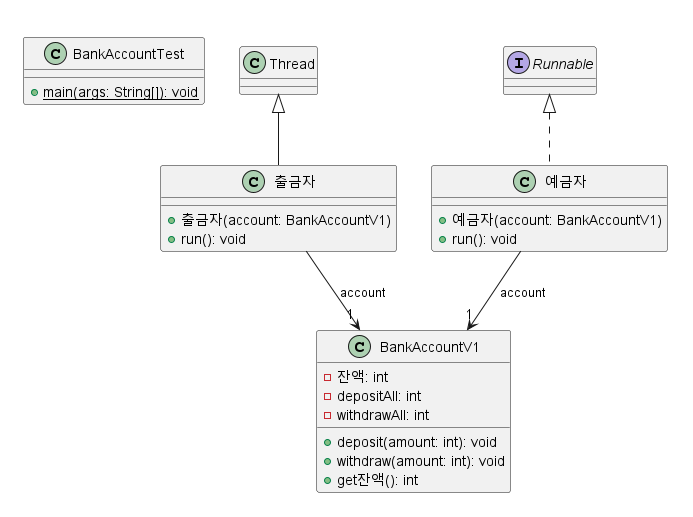
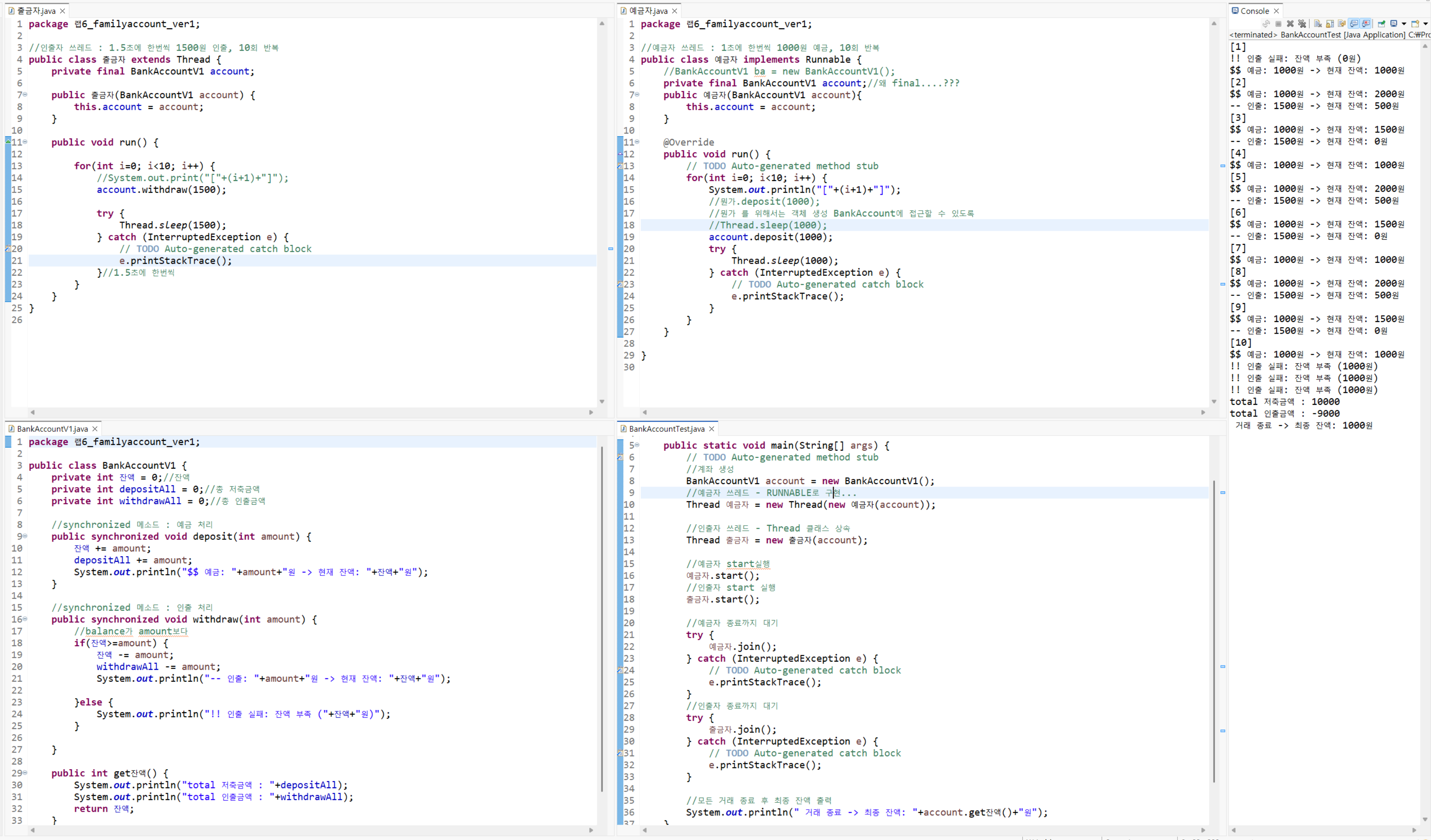
수정사항 : 비어있는데도 인출 먼저 하는 등의 순서 제어 안돼있음.
Lab6 FamilyBank(v2)
- 각 withdraw 메소드, deposit 메소드에 wait() 함수와 notifyAll(), flag 변수인 empty를 이용하여 쓰레드가 둘을 동시에 실행시킬 때 a메소드가 실행하고 있을 땐, b메소드가 wait() 상태가 되도록 제어. 또한 flag변수 초기화를 통해 처음에 예금 먼저 실행되도록 제어.
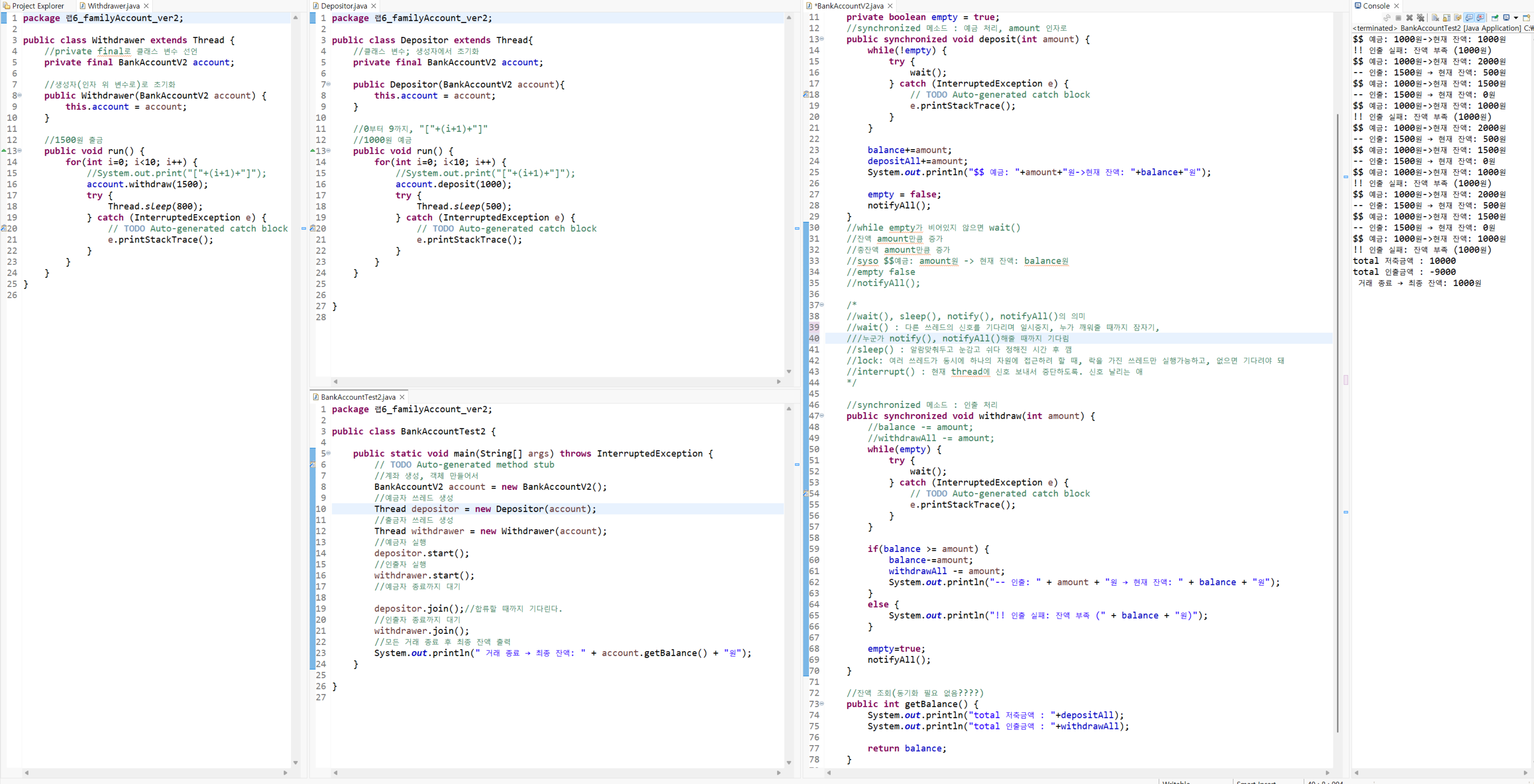
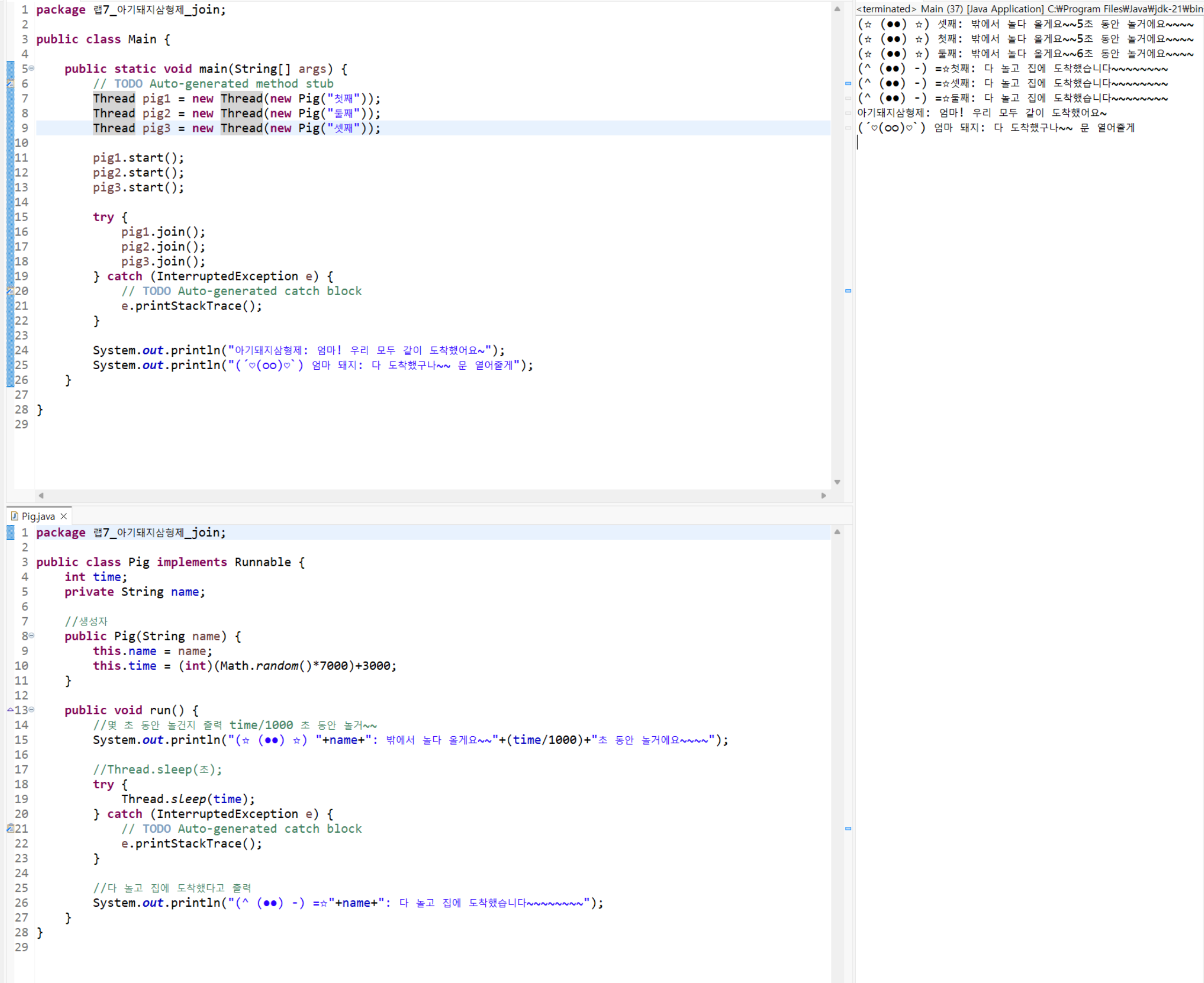
Lab7 아기돼지 - join()
기다리다가 합류
Lab8 잠자는 숲속의 공주 - wait(), notify()
notify()로 wait() 상태를 깨운다.

Lab9,10 빵 생산 소비 - wait(), notify(), flag변수
소비자.start(); / 생산자.start(); 를 해도 생산자가 먼저 실행된다.
get(), put() 메소드에 쓰인 empty 변수, wait(), notifyAll() 덕분에.

정리 및 알게 된 점, 느낀 점
제일 중요하다고 생각되는 것은 다음의 두 그림이다.
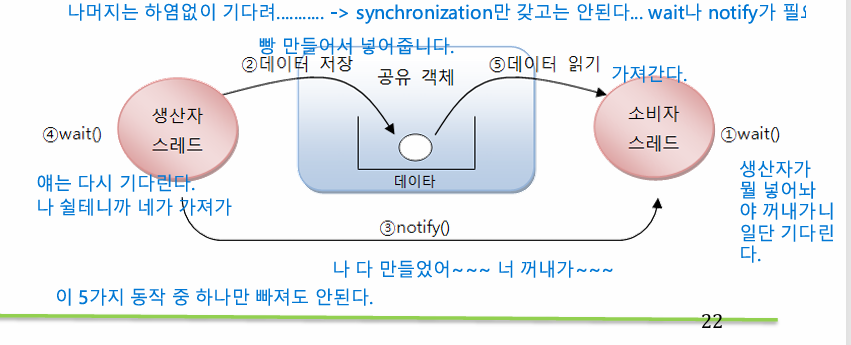
실습 10과 bank 최종 버전을 실습해보니 flag 변수로 제어하려 할 때 이 다섯가지 순서를 그대로 지켜야 한다는 걸 느꼈다.
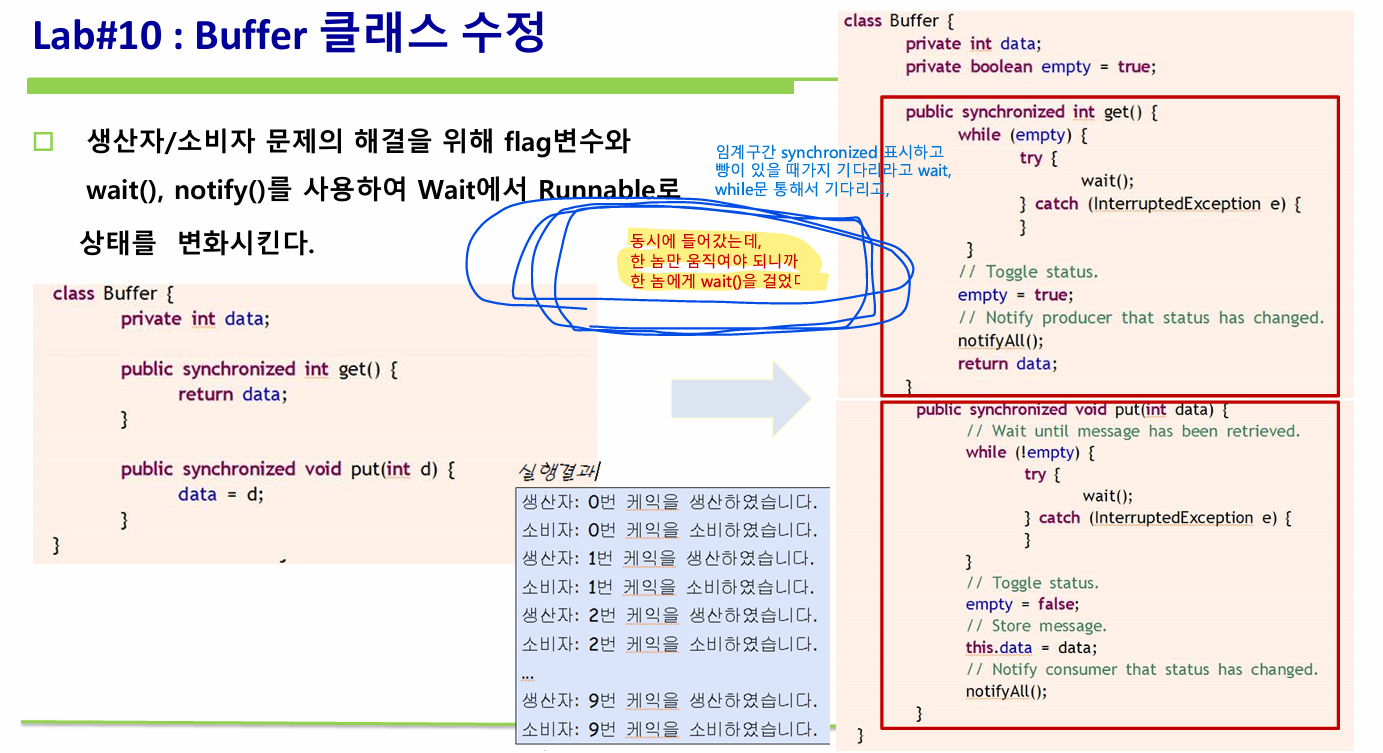
synchronized 덕분에 한 쓰레드만 접근할 수 있게 됐지만,
여전히 그 쓰레드가 get과 put을 동시에 실행시키니 문제였는데(비어있는데도 뭔갈 꺼내려 하는 등)
함수 자체에서 wait()과 notify()를 적절히 사용함으로써 쓰레드가 get에 들어가 뭔갈 할 땐 put 쪽에선 wait하고 있는 게 가능해졌다.
쉽다고 생각하면서 실습하다가도, 실습 10까지 가서야 깨닫는 게 생기기도 했다. Thread라는 개념 자체로 구현할 수 있는게 많은 만큼 쉽다고 만만하게 봐서는 안되는 주제인 듯하다.
'학교 강의 > Java프로그래밍및실습2' 카테고리의 다른 글
| [SOLID 원칙] 커피메이커.ver1 코드 이해하기 - SOLID 원칙 적용 (2) | 2025.10.01 |
|---|---|
| [Thread] 문제 만들기 (0) | 2025.09.30 |
| 제네릭과 컬렉션 5 문제 만들기 (0) | 2025.09.20 |
| 배틀 리팩토링 - 모듈화를 중심으로 (2) | 2025.09.13 |
| 0910 자프실2 수업 복기 (0) | 2025.09.11 |